Case study
From photos on a crew lead's phone to one job file for every roof, inspection to final check
Stormledger Roofing is a residential roofer with three crews, and about half of its roofs are insurance claims. Its job photos were on its crew leads' phones and its claim paperwork in three inboxes. This is the story of the day a supplement was due while its proof sat on a phone on another roof, and of the job file that came out of that day.
- Company
- Stormledger Roofing Residential roofing, about half of it insurance claims
- Industry
- Roofing contractors
- Location
- North Texas
- Size
- 27 employees, 3 crews
Before and after
What the software changes
-
Before Each estimate is worked out on a calculator from the measurement report
After The estimator enters the measurements and picks the shingle line, and the estimate fills in with its material list
-
Before Job photos are on every crew lead's phone
After Photos file under the job and its stage as they are taken
-
Before Homeowners call the office every day to ask when the crew is coming
After The homeowner follows the job on a progress page
-
Before On claim jobs the paperwork is spread across inboxes
After The adjuster's scope, the supplement and the completion photos are in the job file
The story
The business
Stormledger Roofing replaces roofs on houses in north Texas. Dale started with one crew and now has three, and twenty-seven people in all. About half the work is insurance claims after hail, and the rest is homeowners paying for a worn-out roof.
A claim roof carries paperwork: the adjuster's scope, a supplement for what the scope left out, and a final check held until the roof is done. Yolanda, the claims coordinator, ran all of it from her inbox. Brett, the estimator, inspected each roof and then priced it at his desk with the measurement report and a calculator. The job photos stayed on whichever phone had taken them.
The problem
On a Thursday in late April Yolanda had a supplement due by five. The week before, a crew had torn off a claim roof and found fourteen sheets of rotted decking, none of it in the adjuster's scope. The adjuster was leaving for another storm in the morning, and his files were going to someone new.
The proof was on the crew lead's phone. He had photographed the bare deck before the new sheets went down. Now he was on a tear-off across the county, racing the rain, and he wasn't picking up.
At half past three he sent every roof photo he had taken since the hail, with no names on any of them. The company had roofed three houses on that street, and one sheet of gray plywood looks like another. The supplement went in at ten to five with the two photos Yolanda could tie to the house.
While she sorted, a homeowner called for the third day running to ask why shingles had sat in her driveway since Monday. Brett, four measurement reports behind on his calculator, couldn't tell her when the crew was coming.
The next morning Yolanda showed Dale her list of finished claim roofs where nobody had asked for the final check, each waiting on completion photos or an email in someone else's inbox. Dale didn't want a new way to roof. He wanted one file for every roof, and something a homeowner could look at instead of calling.
What was built
PlankByte built a job file for every roof, opened at the first inspection and closed at the final check.
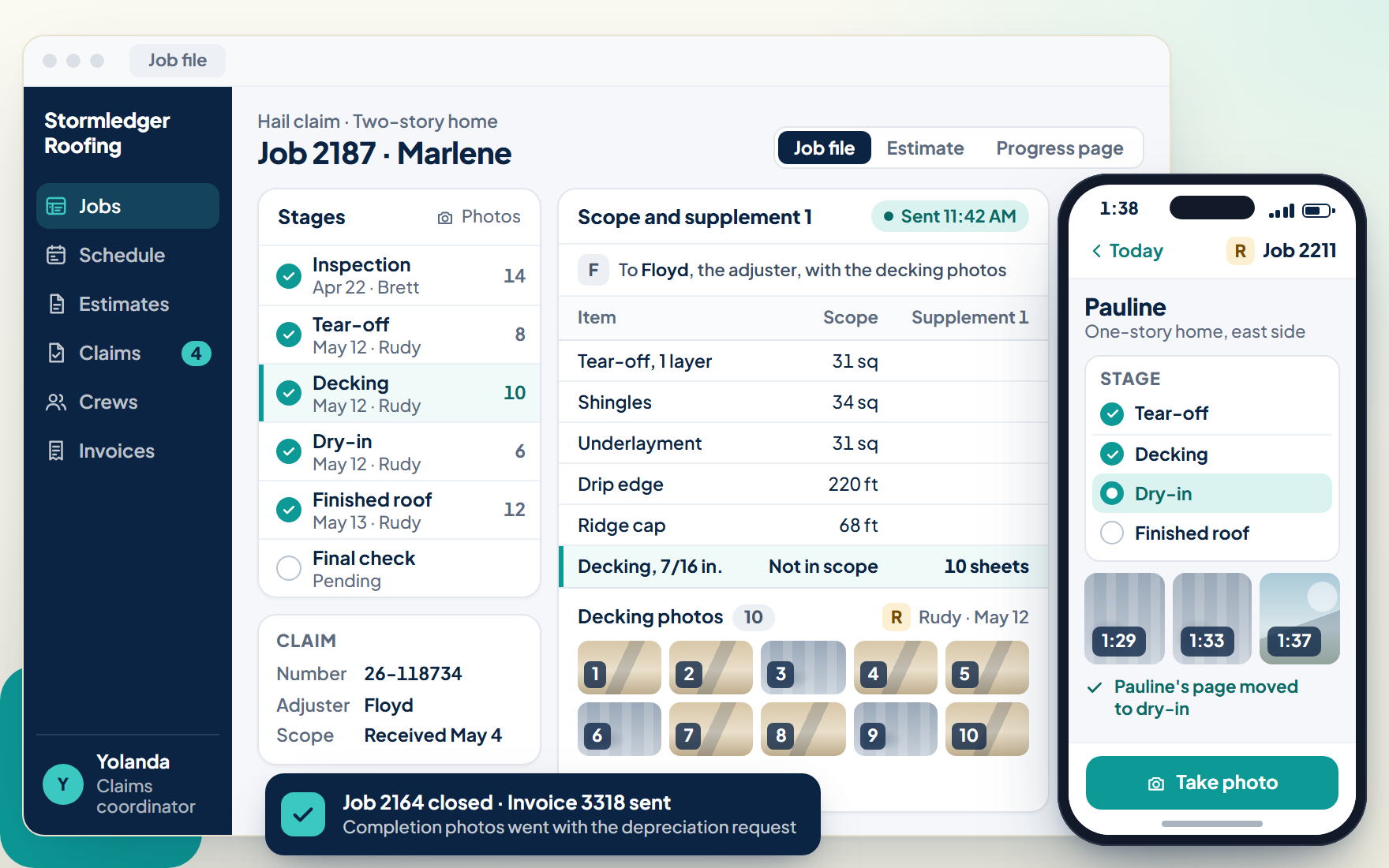
On the roof Brett photographs the damage in the app, and the photos file under the job's inspection stage. At the office he enters the measurements from the report and picks the shingle line, and the estimate fills in with the material list and the price, at the company's own rates.
The homeowner signs and gets a private link to a progress page: the job's stage, the date the crew is scheduled, any weather hold and the newest photos.
A crew lead opens the job, picks the stage and takes the photo: tear-off, decking, dry-in, finished roof. Each photo lands in the file under its stage, and the homeowner's page updates.
On a claim job, Yolanda keeps the claim number, the adjuster's contact, the scope and every supplement in the file, next to the photos that back them up. When the job closes, the invoice goes out, and the completion photos go with the depreciation request.
Dale can see every job, with the stage it is in and what is holding it up.
The first weeks
The job file went into use in January. The company's rates and shingle lines were entered once. Yolanda moved each open claim's scope and supplements out of three inboxes and into its job. The crew leads sent in the photos on their phones, and she filed the ones she could tell apart.
What the crews had to learn was a pause. Bad decking can only be photographed between the tear-off and the dry-in, and a crew with rain coming doesn't like to stop. On the first few roofs the decking stage came in empty. Dale said so, and after that the crew leads called the stop themselves.
A day now
The next spring the hail came back, and on a Thursday in May Yolanda had a supplement due again.
This time the proof was in the job file. The crew lead had stopped his crew at the bare deck, picked the decking stage and photographed every soft sheet. Yolanda set the photos beside the adjuster's scope and sent the supplement before lunch.
The crew lead was on a tear-off across the county again, with rain due by three. His photos reached the job as he took them, and the homeowner watched her page move from tear-off to dry-in.
At the office Brett entered a new roof's measurements, and its estimate filled in. A claim roof finished on Monday closed that afternoon, and its completion photos went with the depreciation request.
The rain came at ten to three. The roof was dried in, and the last photo of it was already in the file.
PlankByte
Case study
Custom software for small businesses.
plankbyte.com/case-studies/roofing-job-file/
Contact: plankbyte.com/contact/